Twizzlo is a flat-rate booking platform for service businesses that bundles unlimited staff, locations, client CRM, online payments, and automated reminders into a single $29.99/mo plan.
Revenue analytics for SaaS founders. See what actually drives your growth.
Submit your website to get discovered by thousands of potential customers and boost your SEO.
Get ListedTwizzlo positions itself as a no-nonsense booking solution for small service businesses tired of per-seat fees and feature paywalls. With a flat $29.99 per month price tag that covers unlimited staff, locations, and bookings, it directly challenges the tiered pricing models of competitors like Booksy and Vagaro. The platform promises a complete front desk replacement—online scheduling, reminders, payments, and CRM—all unlocked from day one, even on its free plan. For businesses looking to streamline operations without scaling costs, Twizzlo presents a compelling value proposition worth a close look.
Twizzlo packs a broad set of tools into a single interface. Here are the standout capabilities:
24/7 Online Booking – Clients can book appointments through a public, real-time availability page that works on any device. The booking flow is designed to be fast, taking roughly 10 seconds from slot selection to confirmation.
Automated SMS & Email Reminders – The system automatically sends confirmations and reminders via SMS and email, which significantly reduces no-shows. The Pro plan includes 50 free SMS credits per month; additional texts cost $0.03 per message on a pay-as-you-go basis.
Client CRM – Every booking auto-generates a customer profile that tracks visit history, notes, allergies, color formulas, and lifetime spend. This data follows the client into every appointment, enabling personalized service.
Payments & Tips – Integrated Stripe Connect powers deposit collection, checkout, and tip acceptance online. Prepaid bookings protect high-value time slots, and tips are auto-deposited.
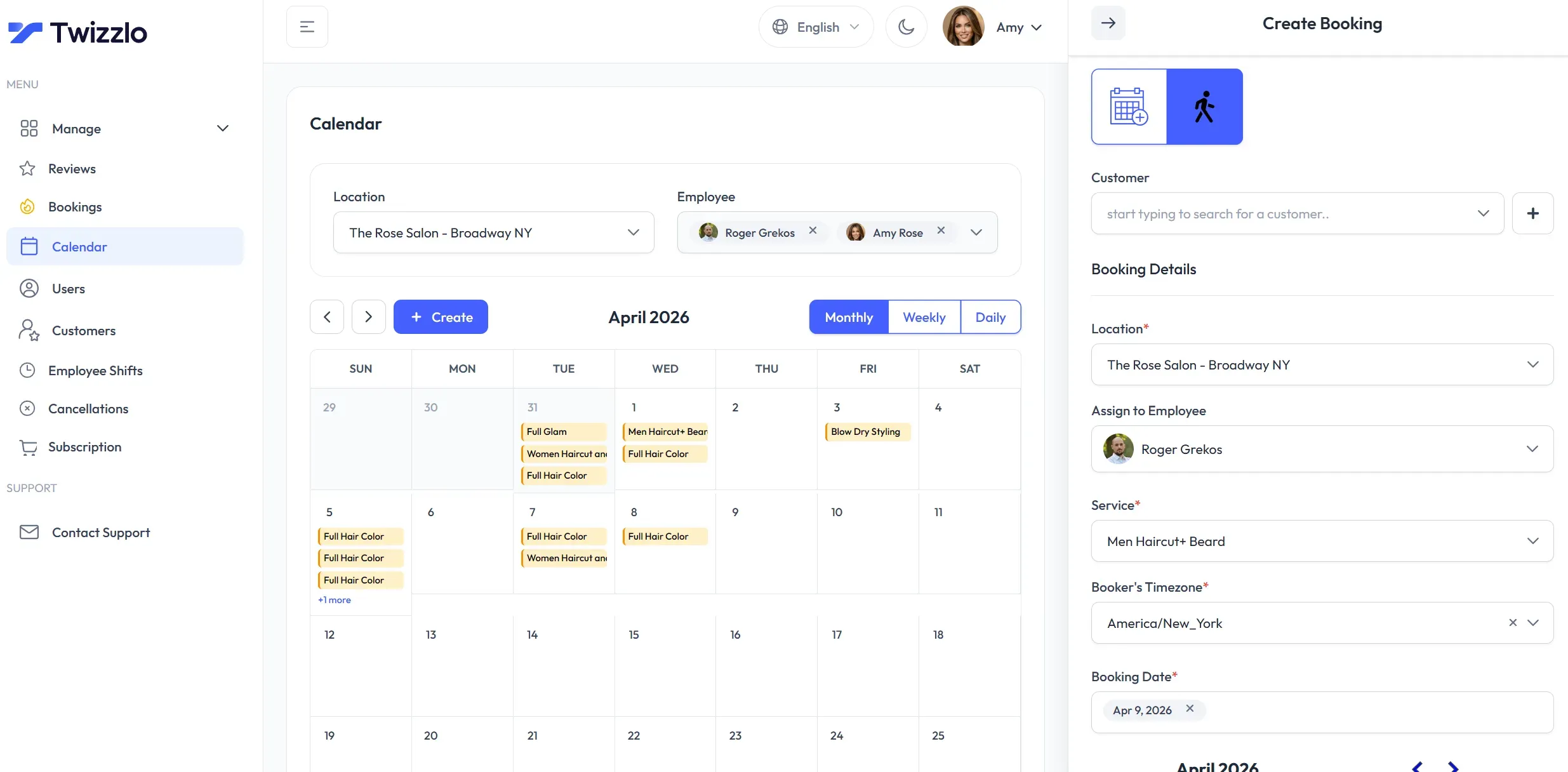
Staff & Shift Management – Unlimited staff members can be added with per-staff calendars, individual schedules, and role-based access. The drag-and-drop calendar supports recurring appointments, block time, and multi-location filtering.
Multi-Location Control – Businesses with multiple branches get dedicated booking links per location, centralized reporting, and the ability to manage shifts across sites—all from one dashboard.
Real-Time Insights – The dashboard surfaces key performance indicators like today's revenue, bookings, staff utilization, and customer satisfaction scores without requiring additional analytics add-ons.
GDPR-Friendly & Secure – Data is encrypted in transit and at rest, with data handling practices designed to comply with GDPR. The platform emphasizes security as a baseline feature.
Twizzlo's onboarding is straightforward. After creating an account (no credit card required), users can set up their service menu, staff profiles, and business hours. The platform claims a 15-minute path from signup to first booking.
The main dashboard acts as a command center, showing a daily snapshot of revenue, upcoming appointments, and client activity. The calendar view allows dragging and dropping appointments to reschedule on the fly. Each staff member can have individual availability, and shifts can be assigned across different locations.
Client communication is mostly automated. Once a booking is made, the system fires off confirmation and reminder messages. The client portal includes self-service rescheduling and cancellation based on policies set by the business owner. Payments and deposits are collected online, and tips are processed through Stripe.
The CRM module quietly builds detailed profiles as clients rebook. Staff can quickly access notes, preferences, and spending history during check-in or while adding new appointments. For multi-location operations, insights roll up across the entire business, while still allowing per-location filtering.
Twizzlo doesn't offer a native mobile app, but the responsive web interface works well on smartphones, covering the on-the-go needs of most solo operators and small teams.
Twizzlo is explicitly designed for appointment-based service businesses. The industry-specific pages highlight a broad range of use cases:
For businesses transitioning from paper booking or messy calendar apps, Twizzlo consolidates scheduling, CRM, payments, and communication into one workflow. That consolidation is often the biggest time-saver.
Twizzlo uses a simple two-tier model:
Neither plan charges per-seat fees, which is the primary disruptor compared to competitors like Fresha or Booksy that often charge per location or per staff member. The Pro plan's flat rate makes budgeting predictable, particularly for growing businesses.
For businesses currently paying $50–$150 per month across multiple tools, Twizzlo's single fee often results in substantial savings. The free tier offers a full-featured trial without time limits, enabling thorough testing before committing.
Twizzlo delivers exactly what it promises: a genuinely flat-rate booking platform with no hidden charges or feature gates. The inclusion of unlimited staff and locations at the base price is a game-changer for small chains and solo practitioners alike. The free plan is unusually generous and functions as a permanent free tier, not just a trial.
There are trade-offs. The lack of a native mobile app may deter some users who prefer native push notifications. The free plan's 150-booking cap could be restrictive for a busy solo provider, but it is reasonable for new businesses. SMS credit limits on the Pro plan are modest, though the pay-as-you-go option offers flexibility.
Overall, Twizzlo is a strong contender for small service businesses seeking an affordable, all-in-one scheduling solution. Its transparent pricing and comprehensive feature set make it particularly attractive to independent professionals and multi-location operators who want to minimize software overhead.
For further details, check out the full feature breakdown, the pricing page, or read comparison guides to see how it stacks up against competitors.