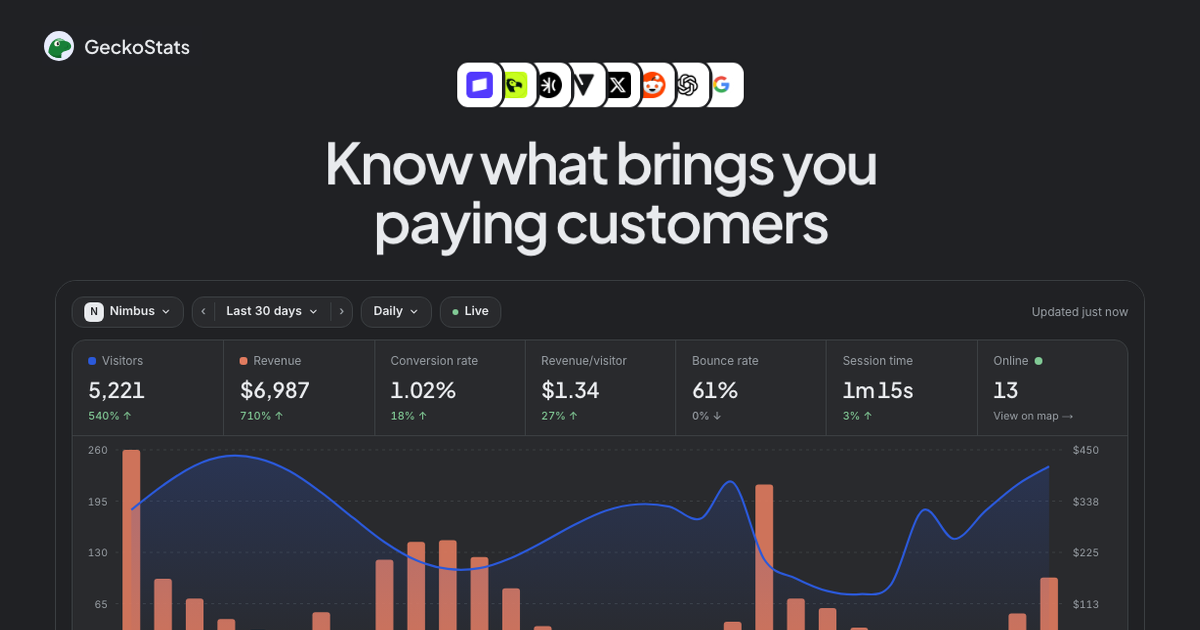
GeckoStats is a cookieless analytics platform that pairs visitor tracking with Stripe, Polar, Creem and Dodo payment webhooks, so every traffic source, campaign and search query carries the revenue it actually generated.
The website review directory that helps you rank on Google, ChatGPT, Claude, Gemini & Perplexity with dofollow backlinks and AI reviews.
Submit your website to get discovered by thousands of potential customers and boost your SEO.
Get ListedGeckoStats is a web analytics product built on a single premise: traffic counts are cheap, and knowing which traffic produced money is not. Instead of ending the funnel at a pageview, the platform connects a payment provider's webhook back to the visitor record that generated the sale, then surfaces that link everywhere — in channel tables, campaign rows, page reports, Search Console queries and per-person journey timelines.
The tool sits in the privacy-first analytics segment alongside Plausible, Fathom, Umami and DataFast, and the site maintains explicit comparison pages for each of those competitors. Its differentiation is not the shape of the dashboard, which deliberately echoes the single-column, low-cardinality style popularised by Plausible, but the money column bolted onto every row. Channel breakdowns display visitors and revenue in the same view; campaigns show earnings next to the tweet or newsletter that carried the link; Search Console queries are ranked by attributed revenue rather than click volume.
The technical footprint is intentionally small. The tracking script is 6.6 KB gzipped, has no dependencies and loads after the page. By default it sets no cookies at all — a visitor is represented by a salted hash of IP, user agent and site that rotates daily, and the raw IP address is never persisted. Because nothing is stored across days or across domains, the vendor argues no consent banner is required in the default configuration. An optional per-site cookie mode exists for teams that need persistent identity, with the vendor explicitly deferring legal judgement to the customer.
A second, less conventional pillar is agent access. GeckoStats exposes itself as an MCP server with 26 read-only tools, letting Claude, Claude Code, ChatGPT, Cursor, Gemini CLI, Grok and other MCP clients query the same numbers the dashboard renders. A REST API sits alongside it for custom payment providers and bespoke reporting. The combination of revenue-first reporting, cookieless defaults and machine-readable access positions the product toward founders, indie creators and small SaaS teams rather than enterprise analytics departments.
Revenue attribution across four payment providers. Stripe, Dodo Payments, Polar and Creem each connect through a single webhook, and sales land beside the source that produced them. For anything else, one API call carrying an amount and a visitor identifier achieves the same result. Attribution logic falls back through several signals in a defined order — the checkout's visitor id, the return page, the customer's prior payments, an identify() email match, and finally checkout timing — and the dashboard reports which method matched.
Per-customer journey timelines. Each paying customer gets an expandable profile listing first source, visit count, total spend and time-to-first-payment, followed by a chronological stack of sessions. Individual sessions break down into pageviews, goal completions and payment events with timestamps, so a route such as a launch tweet, a return visit to the pricing page and a purchase two weeks later stays legible as one thread.
Campaign and UTM reporting. Tagged links are reported by name rather than by raw query string. A row such as launch-tweet, newsletter-42 or podcast-ep12 carries its own visitor and revenue figures, which makes the practical question — which post paid for itself — answerable without exporting anything. Last-source credit is preserved when a visitor returns directly, so a social post is not silently stripped of a sale that closes later.
Search Console integration with revenue weighting. Connecting Google Search Console once pulls queries, pages and countries into the dashboard, ranked by attributed earnings rather than volume. Figures are prefixed with ≈ because Google never ties a query to a person; the vendor treats them as apportioned estimates, and pages without traffic are not priced at all. The same section exposes queries losing clicks at a stable position, which is a useful decay signal.
AI crawler visibility. Because crawlers execute no JavaScript, a tracker script cannot observe them. GeckoStats reports server-side what agents such as GPTBot, ClaudeBot, PerplexityBot and Gemini read, then places those reads against the visitors and revenue the same services sent back. The read-versus-returned framing is unusual among analytics tools and directly addresses a question SEO teams have been asking since AI referrals became measurable.
MCP server and REST API. The platform exposes 26 tools covering overview, sources, pages, goals, funnels, customers, search queries, releases and the live view. Keys are issued per website and revocable from settings, and agents are read-only unless permissions are explicitly widened. The connection is a single command or a connector entry, and the vendor stresses that agents query the same read path as the dashboard rather than a copy.
Real-time globe and event feed. A live map shows everyone on the site at any moment, accompanied by a streaming feed of pageviews, goal completions and payments with geography and referral context. An optional sound cue fires on each sale. It is a presentational feature rather than an analytical one, but it makes launch days observable in a way that static reports are not.
Goals, funnels, MRR and alerts. Button clicks and signups can be defined as goals, with step-by-step drop-off between them. Subscriptions roll up into MRR, churn and lifetime value by source, retention reports show week-over-week return behaviour and the value of returners, and alerts fire on tracking failure, revenue drops, organic click declines, deindexed pages or queries slipping five positions. Release markers, posted with a curl at deploy time, annotate the chart so a dip can be read against what shipped.
Onboarding starts with an account and a seven-day trial that applies to every plan. The first step is registering a website and copying the tracking snippet. The script can be served from the customer's own domain using a one-line rewrite, which prevents ad blockers from intercepting it; the vendor notes that payments are recorded regardless, because those arrive through the webhook rather than the browser.
The second step is connecting a payment provider. Stripe, Polar, Creem and Dodo Payments each require a webhook configuration, after which completed checkouts begin flowing into the dashboard against visitor identifiers. Custom or regional providers use a single API call. Optional enrichment is a call to identify() with an email address, which strengthens later matching when a visitor's device or network changes between first touch and purchase.
The third step, for teams that want organic detail, is authorising Search Console. This unlocks query-level reporting with revenue attached. Crawler monitoring activates independently, since AI agent hits are captured from the site's own logs rather than from JavaScript.
Day-to-day use centres on the overview: a visitor chart, a revenue line and a channel table where each row is clickable. Selecting a source filters the entire dashboard, and the same drill-down behaviour applies to countries, campaigns and pages. From there a user can open a customer record and read the full pre-purchase history, inspect funnels for drop-off, check MRR and churn by acquisition source, or pull retention cohorts. Alerts arrive when a metric moves outside expected bounds, and release markers let engineering correlate traffic shifts with deploys.
For agent-driven workflows, a key is issued for a specific site and pasted into an MCP client configuration. A single command registers the server with Claude Code; other clients use a connector or settings entry. Subsequent prompts return dashboard-equivalent data scoped to the keyed site. Teams can revoke a key at any time without affecting dashboard access, and there is a demo account available at the live demo for evaluation before installing anything.
Indie SaaS founders doing their own marketing. A solo operator publishes across social, a newsletter and occasional search content, and needs to know which of those channels converts to paid. GeckoStats answers that directly: the channel table separates visitor volume from revenue, so a channel with modest traffic but strong earnings becomes obvious. The MRR-by-source view extends the question to retention, distinguishing channels that bring churn-heavy signups from those that bring durable accounts.
Newsletter and content creators running tagged links. A writer distributes a distinct tagged link for each issue, post and platform. Each appears by name with its own visitor and revenue totals, including sales that close weeks later via a direct return. The attribution fallback chain matters here, because newsletter readers rarely buy on first click and often return without a referrer.
SEO teams prioritising by earnings rather than volume. A B2B team with an existing Search Console property imports queries and immediately sees which ranking positions actually pay. Opportunities get ranked by money instead of impressions, and pages that rank well but earn nothing become visible as such. The AI crawler tab adds a second dimension — how much content assistant-driven crawlers consume versus how much traffic they return.
Development teams wiring analytics into agent workflows. An engineering team connects the MCP server to Claude Code or Cursor and asks questions in natural language during a sprint: which page earned most last week, which funnel step loses the most people, whether last Tuesday's deploy coincided with a dip. The same 26 tools back both the terminal and the editor, and the REST API supports custom dashboards without scraping.
Small agencies managing multiple client properties. The Growth tier raises the ceiling to 30 sites and 30 seats, which is enough for a boutique agency to run separate properties under one billing relationship. Per-site keys, share-as-PNG exports and release markers are the practical operators in that setting, and the absence of cookie banners simplifies consent conversations on client sites.
Pricing is structured around monthly event volume rather than seats or pageviews alone. The public calculator offers eight tiers from 25K to 10M events per month, and an event is defined as a pageview, a goal completion or a payment, with crawler hits counted separately and excluded from quota.
Two plan families sit on that ladder. Starter is aimed at one site and one person; at the 100K-event position it is listed at $17 per month billed monthly. Growth targets multi-site and multi-person use and sits at $35 per month at the same volume, raising limits to 30 sites and 30 team seats. Feature parity between the two is notable — real-time dashboard, live globe, user profiles, funnels, revenue tracking, Core Web Vitals and the full set of extras appear on both. Growth only adds scale.
A 17% discount applies to yearly billing. The homepage advertises pricing from $9 per month, which corresponds to a smaller event tier on annual terms rather than the 100K monthly figure. VAT is excluded and may apply at checkout.
Overage handling is soft: data keeps flowing, and the account receives a suggestion to move up a tier. Two consecutive overage months trigger a request to upgrade rather than a hard cutoff. Value-for-money is strongest for teams that would otherwise stitch together a lightweight analytics tool and a separate attribution product; consolidating those into one bill is the real saving, and the inclusion of Search Console reporting plus agent access on the base plan removes the usual upsell ladder. Teams with very high traffic should model the 1M-plus tiers carefully, since per-event rates are not published outside the calculator. Full tier details are on the pricing page.
GeckoStats fits small and mid-sized product organisations that sell something and want acquisition data tied to outcomes. Indie founders, bootstrapped SaaS teams, newsletter operators and boutique agencies are the clear core audience: they have modest traffic volumes, they care about revenue per channel more than statistical depth, and they benefit from a tool that installs in minutes and requires no consent banner.
Developers are a secondary audience, and an unusually well served one. The MCP server, REST API and per-site key model are more than most analytics vendors offer, and the release-marker curl is a small but telling detail aimed at people who deploy frequently. Teams already using AI assistants for analysis will find the read-only agent surface immediately useful.
Where the product fits less well is in organisations with heavy enterprise reporting requirements. There is no mention of data warehouse export, SAML single sign-on, custom role hierarchies, audit trails or a dedicated SLA. Multi-touch attribution models are not described; credit appears to follow a last-meaningful-source rule with fallbacks, which is pragmatic but not configurable in the way large marketing operations expect. Companies with legal constraints on third-party analytics should read the sub-processor and DPA documentation before committing.
Teams deeply invested in Google Analytics 4's exploration features, BigQuery export or audience integrations will find this a narrower instrument by design. The vendor's own comparison against Plausible is candid about where competing products do things better, which is a useful starting point for anyone weighing alternatives.
GeckoStats makes a defensible argument that the analytics market's real gap is not measurement but attribution. Plenty of tools will report that a launch drove 4,000 visitors; far fewer will report that the same launch produced $3,120 and that the second post in the sequence produced almost nothing. By pushing payment webhooks into the core schema rather than treating revenue as an add-on, the product answers a question founders actually ask.
The execution has several genuine strengths. Privacy defaults are strict without being dogmatic — the daily-rotating hash and the refusal to store IPs are backed by an optional cookie mode for teams that need persistence. Agent access through MCP is implemented as a first-class read path rather than a bolted-on chatbot, with per-site keys and read-only defaults that reflect sensible caution. The honesty about estimates is also worth noting: query-level revenue is marked approximate, Core Web Vitals wait for sample thresholds, and demo data is labelled wherever it appears.
There are real limitations. Documentation of attribution modelling is narrative rather than configurable, so teams wanting first-touch or linear splits may find the default logic opinionated. Enterprise controls are thin: no SSO, no warehouse export, no published SLA. And the pricing ladder, while generous on features, becomes harder to evaluate at high volumes without direct contact. Integration breadth for payment providers is good but finite at four out-of-the-box options, with everything else resting on a generic API call that assumes some engineering capacity.
The recommendation is straightforward. For a founder, newsletter operator or small SaaS team already processing payments through Stripe, Polar, Creem or Dodo, this is one of the few analytics tools that closes the loop between a marketing action and a bank transfer without a second product or a data pipeline. Teams needing deep custom modelling, enterprise governance or warehouse-native reporting should look at established platforms — and should read the vendor's own comparison pages first, since they are unusually willing to name what competitors do better. Detailed provider setup guides, including the Stripe integration, cover the practical wiring.