RestorePhotosApp Review 2026: AI Photo Restoration Tested
RestorePhotosApp is a browser-based AI tool that repairs, sharpens and colorizes old photographs using credit packs instead of a subscription. This review covers its five styles, 1080p output, 30-day storage window, pricing from $0.44 to $0.70 per photo, and undisclosed limits.
RestorePhotosApp is a browser-based AI service that repairs, sharpens and colorizes old or damaged photographs, with a strong emphasis on faces. According to its about page, the service is independent rather than part of a larger imaging suite. It runs on Google's Gemini family of image models in the cloud, so nothing needs to be installed and the workflow is the same on a laptop, tablet or phone.
The problem it targets is familiar to anyone with a box of prints: faded color, scratches, creases, soft scans and one good portrait with a tear through it. The site puts professional restoration at $50 or more per image, which makes a full album impractical. RestorePhotosApp positions itself as the low-cost alternative, with credit packs that work out to roughly $0.44 to $0.70 per photo and no subscription.
In market terms, the product sits between manual editing in Photoshop-style tools and studio services that charge per image. It also overlaps with consumer enhancers and colorizers. The site reports 470,000+ users and 2M+ photos restored. Both figures are self-reported and cannot be verified from the pages reviewed.
Key Features
RestorePhotosApp organizes its tooling around "styles" applied to an uploaded image. The main capabilities, as described on the site, are listed below.
Restore (advanced face restoration): The core mode targets scratches, dust, noise, fading, creases and blur on old prints. The site says the model rebuilds faces, eyes, skin texture and hair while keeping the original character of the photo. It is trained on photographs from the 1800s onward, according to the product pages.
Colorize: Black-and-white and sepia images are converted to color by predicting skin tones, clothing and background hues from context. Colorization costs one credit, the same as any other style. The site admits the colors are plausible interpretations, not historical fact.
Sharpen (unblur): This style reconstructs detail in motion-blurred, shaken or out-of-focus shots, rather than only raising edge contrast as a conventional sharpening filter does. The site says it also reduces noise as a side effect, which helps with grainy low-light phone photos. Results degrade when a face is nearly unrecognizable to begin with.
Pros
+The Restore style targets scratches, dust, noise, fading, creases and blur while rebuilding faces, eyes, skin texture and hair on prints dating from the 1800s onward.
+The Sharpen style reconstructs detail in motion-blurred or out-of-focus shots and reduces noise, which helps with grainy low-light phone photos.
+Credit packs never expire and have no subscription, with per-photo cost falling from about $0.70 on Starter to about $0.44 on the Archive pack.
+A draggable before/after slider and 1080p downloads let each result be checked against the original, with processing quoted at under 30 seconds.
+Originals and restorations sit privately on Cloudflare R2 for 30 days with early deletion available, and the site states photos are not shared or used to train models.
Cons
–Team accounts, API access, integrations and a maximum batch size for bulk restoration are not disclosed, which leaves professional and high-volume use uncertain.
–Enhance and Cleanup are listed as styles without any explanation of how they differ from Restore, and the site gives inconsistent figures for its user count (470,000+ versus 500,000+).
–Iterative work consumes extra credits, since each second pass, style chain or 3-credit animation draws from the same balance, and files are deleted after 30 days, so prompt backups are required.
Enhance and Cleanup styles: Besides Restore, Colorize and Sharpen, the FAQ lists Enhance and Cleanup as selectable styles. The site gives little detail on how they differ. Judging them requires a test upload.
Bulk Restoration: For a shoebox of prints, the site says many photos can be processed in a single session instead of being uploaded one at a time. The pages do not disclose a maximum batch size or queue behavior.
Animate Photos with Credits: A restored portrait can be turned into a short video with subtle motion such as blinking, a soft smile or a slow camera push-in. Each animation costs 3 credits, so the feature draws from the same balance as restorations.
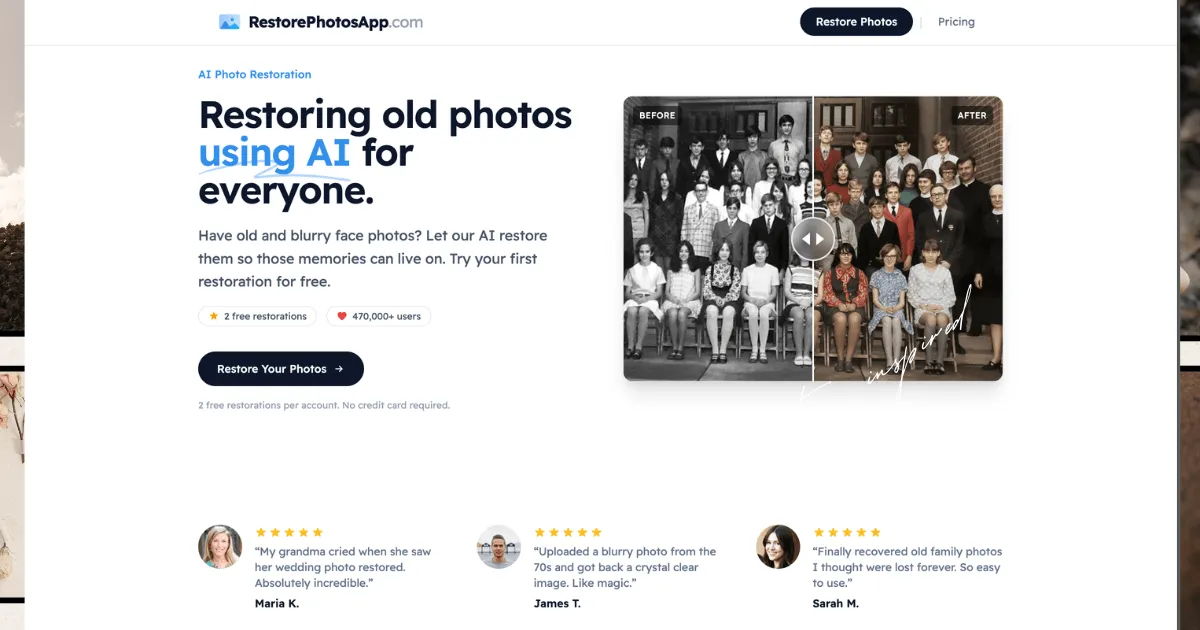
Before/after slider and 1080p output: Results appear next to the original with a draggable comparison slider, and downloads are delivered at 1080p. The site notes that scan or capture quality limits the final result. Uploads should be uncropped, because the model uses surrounding context.
Time-limited storage: Originals and restorations are stored privately on Cloudflare R2 for 30 days, then deleted automatically. Individual restorations or the whole account can be deleted earlier. The site states that photos are not shared with third parties or used to train models.
How It Works
The workflow is deliberately short, and the site stresses that no editing skill, sliders or masks are involved.
Digitize the print. The site's guide recommends a flatbed scan at 600 DPI or higher, in color even for black-and-white originals. A phone photo taken flat, in bright indirect daylight, is described as an acceptable substitute. Curled prints should be flattened first.
Create an account. Every new account receives 2 free restorations with no credit card required. This is the only trial mechanism, since the pricing area states that no standard free trial exists. Some page copy mentions trying the tool without an account, which sits awkwardly beside the account-based free credits.
Upload and choose a style. The photo goes through the restore tool by drag-and-drop or file picker. The next choice is Restore, Colorize, Enhance, Cleanup or Sharpen. Uncropped uploads are recommended because the model draws on background and clothing context.
Review the result. Processing is quoted at under 30 seconds. The output appears beside the original, and the slider shows exactly what changed.
Download or iterate. Results download at 1080p. Heavily damaged photos can go through a second pass, which the site says costs one more credit. Recommended chains are restore then colorize, or restore then sharpen for soft vintage prints.
Back up promptly. Because files are purged after 30 days, the site advises saving restored images to cloud storage and an external drive.
Use Cases
The product pages and FAQ point to a handful of concrete scenarios.
Family archivist digitizing a shoebox: A relative sorting through decades of prints can scan them, run Restore on each and end up with a clean digital album. The Family or Studio packs suit this job, and the original prints stay safely stored. The outcome is a shareable, printable set of files instead of fading paper.
Genealogist working with a single surviving portrait: A researcher holding one grainy photo of an ancestor can restore it, then colorize the cleaned version for a more lifelike image. The site recommends restoring first so the colorizer works on a clean source. The practical result is a usable image for a family tree or a printed history, with the caveat that colors are inferred.
Parent rescuing a blurry moment: A shaky shot of a child's first steps or a soft wedding candid can be fixed with Sharpen, as described on the fix blurry photos page. Mild to moderate blur typically recovers well. Extreme smears give the model little to work with.
Gift maker creating a memorial or anniversary tribute: Someone preparing a gift can restore a portrait of a grandparent and then animate it, at 3 credits. The result is a short moving clip for a slideshow or card.
Small photographer or archivist handling client scans: The site states that full commercial rights and ownership of the photos remain with the user. A freelancer cleaning up client prints can use bulk processing and the Archive pack for larger runs. Whether any team features or API exist is not disclosed.
Pricing & Value
Pricing is one-time credit packs, with no subscription and credits that never expire. One credit buys one restoration in any style. Prices exclude VAT, according to the site.
Starter: $6.99 for 10 credits (about $0.70 per photo).
Pro: $16.99 for 25 credits (about $0.68 per photo).
Family: $29.99 for 50 credits (about $0.60 per photo), flagged as best value.
Studio: $54.99 for 100 credits (about $0.55 per photo). The FAQ says this tier adds priority support.
Archive: $109.99 for 250 credits (about $0.44 per photo).
Every pack carries a 30-day money-back guarantee. The listed features are high-resolution output, non-expiring credits and animation using credits. The site is inconsistent about whether lower tiers get 1080p, because the FAQ says all restorations are delivered at 1080p.
On value, the economics are strong against studio rates of $50 or more per image, provided the work is mostly faces and moderate damage. Credit-based billing suits occasional users because nothing renews. Costs rise on iterative work, since each second pass or style chain consumes another credit. A cautious buyer should spend the 2 free restorations on a difficult photo before committing.
Who It's For
The service fits individuals and families, hobbyist genealogists and small-scale archivists who need to process dozens to a few hundred photos without learning editing software. Freelance photographers and memorial or gift-service businesses could use it as a low-cost cleanup step. The site claims commercial rights, though contract details are best confirmed in the terms of service.
Pack-based pricing favors one-off projects over continuous high-volume work. The site does not disclose team accounts, shared workspaces, API access, integrations or enterprise terms, so organizations needing those should ask first.
Several groups should look elsewhere:
Museums and conservators who require documented, faithful reconstruction rather than plausible inference
Photographers who want layer-level control and selective retouching
Users whose photos are mostly landscapes, documents or objects, since the product is positioned around faces
Anyone who needs offline processing, because everything runs in the cloud
Users needing guaranteed recovery of badly torn or missing areas, which the site itself says are only reconstructed
Final Thoughts
RestorePhotosApp does a narrow job in a clear way. It offers a simple upload-and-pick-a-style workflow, five styles, 1080p output and pricing that falls to roughly $0.44 per photo on the largest pack. Its candor is a strength. The site states that the AI reconstructs rather than recovers, that colorization is an interpretation, and that results vary with source quality.
The weak spots are mostly gaps in disclosure. Team features, API access, batch limits and the difference between the Enhance and Cleanup styles are not documented. The user count appears as 470,000+ on some pages and 500,000+ on others. The 30-day deletion window demands prompt backups. Credits can also add up when photos need two passes.
For households, genealogists and light professional use, the recommendation is positive. Start with the 2 free restorations on the hardest photo, then buy the smallest pack that fits the collection. Archivists who need provable fidelity should treat the output as a viewing copy, not a replacement for the original.