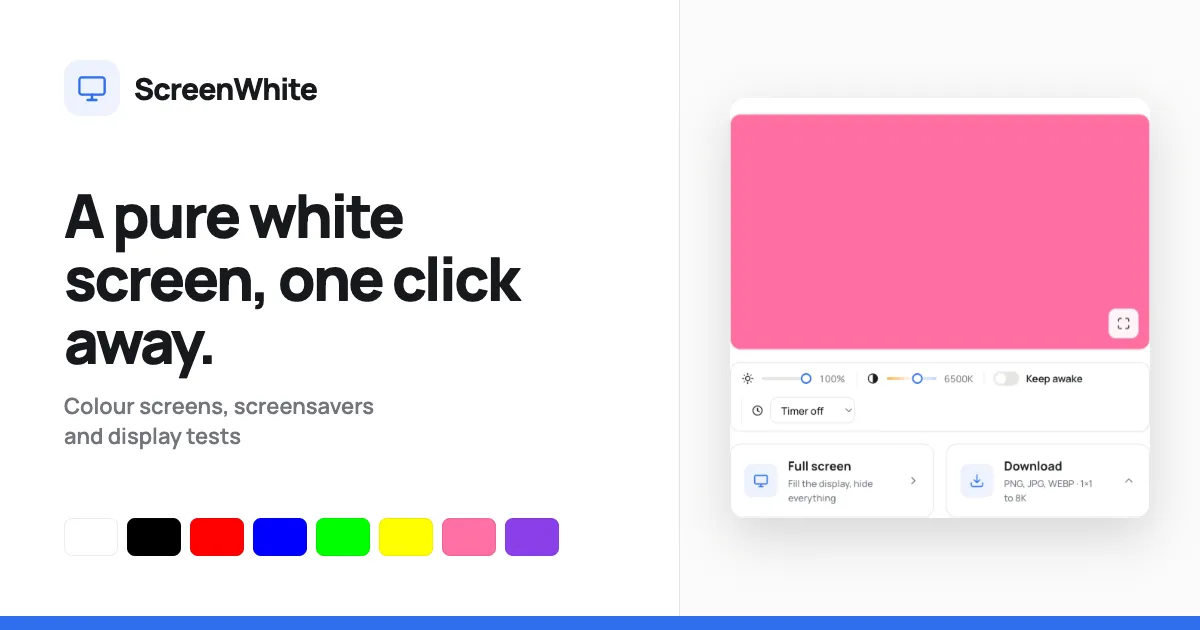
A free browser-based utility that fills the screen with pure white, providing brightness/warmth controls, keep-awake, timers, and optimized white image downloads from 1×1 to 8K in PNG, JPG, or WEBP formats.
Get listed across 100+ startup directories, submitted by hand. Permanent dofollow backlinks and +25 domain rating on average.
Submit your website to get discovered by thousands of potential customers and boost your SEO.
Get ListedMost color-screen websites are nothing more than a static HTML page with a background color and a fullscreen button. ScreenWhite ups the ante by wrapping the humble white screen in a set of genuinely practical features: adjustable brightness and color temperature, a display-awake toggle, integrated timers, and a download studio that can generate white images from a single pixel all the way up to 8K. The result is a free tool that feels like a thoughtful companion for video callers, photographers, digital artists, and anyone who simply needs a consistent, reliable white field on demand.
It’s part of a wider ecosystem of screen utilities — including black, red, and other solid colors, plus fake update screens and dead pixel tests — and other colour screens are only a click away. The white screen itself is the flagship, and the implementation details reveal a developer who cares about speed and privacy.
The page carries its colour as an inline HTML style, so the browser paints the white field on the very first frame — before CSS or JavaScript loads. There’s no white flash after the page settles; the screen just appears. A dedicated “Full screen” button fills the display and hides every other element. Pressing the F key does the same on desktop, and Escape brings the interface back.
Instead of a CSS filter that tints the whole viewport, ScreenWhite recomputes the underlying colour. The brightness slider ranges from 10% to 100%, and the temperature slider runs from a warm 2000K to a cool 9000K. The values are converted mathematically into RGB multipliers, which means the page remains crisp and doesn’t incur a per-frame compositing cost. This is ideal for matching ambient room lighting or tuning the screen for tracing tasks.
A common pain point when using a white screen for lighting or display tests is the OS turning off the display after a period of inactivity. ScreenWhite’s “Keep awake” toggle uses the Screen Wake Lock API to ask the operating system to keep the screen on. It works in modern browsers and is released automatically when the user leaves the page or switches tabs. The tab reacquires the lock when it becomes visible again.
For scenarios where the screen should not stay on forever, a timer can automatically exit full-screen mode after 1, 5, 10, 20, 30, or 60 minutes. This is handy for timed photography backdrops or ambient lighting sessions where a reminder is needed.
The download panel is surprisingly deep for such a minimal site. Users can pick between PNG, JPG, or WEBP and choose a preset output size: Full HD, 2K, 4K, 5K, 8K, Mobile (1080×1920), Square (2048×2048), or even a 1×1 pixel. PNG files are generated server-side as one-bit palette images, making them incredibly small — even an 8K file is around four kilobytes. The other formats are encoded in the browser. No watermark is applied, and files are generated on the fly.
Users who prefer to avoid the UI can download white images via direct links formatted like /image/white-3840x2160.png. This makes it easy to fetch a white background for wallpapers or graphics without opening a single panel.
Every colour has its own page. A user can append any six-character hex code after /screen/ and land on an exact shade — for example, /screen/FFEEAA gives a custom warm cream. This turns the tool into a simple color reference that can be shared as a URL, making it useful for client discussions or team alignment.
The website expands well beyond the white screen. The navigation includes links to other solid colour screens, and the full list of screen tools provides tests and pranks like a dead pixel test, monitor uniformity checker, fake OS updates, and even a DVD screensaver recreation. The tools are just as minimal and fast as the white screen.
The engineering behind ScreenWhite is deliberately minimal. There is no database, no analytics, no user tracking — the tool is essentially a static page with a small JSON-like configuration carried entirely in the URL. When a visitor loads a color screen, the colour is baked into the body tag as an inline style. The JavaScript that follows enhances the experience (wake lock, timers, downloads), but the base presentation never depends on it.
When the user enters fullscreen, a stage element that is already painted in the target colour is revealed, and the rest of the UI is hidden. The brightness and warmth sliders mutate that stage colour in real-time, updating the inline style property. A "keep awake" checkbox issues a wake lock request when the page is visible; if the wake lock API is missing, the control is disabled.
Downloads in PNG mode use a server endpoint that crafts a minimal palette image — this is why the file sizes stay tiny at massive resolutions. For JPG and WEBP, the browser itself renders the colour to a canvas and exports the file. The download panel presents a choice of dimensions, and individual size presets are actually buttons that trigger the generation directly, avoiding intermediate server round-trips where possible.
The about page goes deeper into the design philosophy, emphasizing speed and privacy as central goals. The entire site is said to be around six kilobytes, with no framework weight.
The practical applications of a white screen are broader than one might expect.
Video conferencing fill light: The soft panel of light emitted by a white screen placed beside a laptop can dramatically improve a video call. Instead of buying an expensive ring light, remote workers can use ScreenWhite as a fill, adjusting warmth to match indoor lighting.
Tracing and calligraphy: Graphic designers, tattoo artists, and hobbyists can place paper over a tablet or phone screen and use the crisp white backlight to trace complex artwork.
Photography and product shots: A white screen can serve as a clean background for small product photos, and the ability to download a 4K or 8K white image makes it easy to generate editing backgrounds without photographing a piece of paper.
Dead pixel checks and monitor tests: The uniform white field is the classic way to expose dead or stuck pixels. Combined with the site’s dedicated dead pixel test cycle, this tool becomes part of a thorough display health check.
Creative mood lighting: For events, games, or home theatre, a full white screen can serve as an ambient lamp. The brightness and warmth sliders let users simulate natural or tungsten light to match the time of day.
Reproducible setups for developers: The URL-carrying color makes it possible to share a specific lighting configuration with remote teammates, or to save a bookmark to a known custom shade.
ScreenWhite is completely free, and no sign-up or account creation is ever required. There is no premium tier, no watermark, and no artificial feature gating. The tools are supported by reserved ad slots, but the current experience remains uncluttered. For a free utility, the download quality is exceptionally high: a high-resolution white PNG is generated server-side without taxing the client’s CPU or battery.
The same features are served with negligible bandwidth cost, thanks to the compact codebase and optimized image generation. This gives it a value proposition that rivals paid screen tools or mobile apps, while maintaining the convenience of a URL link. Users can even self-host? No, but they don't need to; the site is reliable.
ScreenWhite is a well-crafted niche tool that understands the small details matter. The implementation is thoughtful: no flicker on load, proper use of the Wake Lock API, swift downloads with surprisingly small files, and a URL model that is easy to repeat. The absence of an account system and database makes it a refreshing choice for privacy-conscious users.
The caveats are mild: iOS Safari’s fullscreen limitation is a browser restriction more than a site flaw, and the wake lock toggle is dependent on modern browser support. Some users might also wish for an option to save and reuse custom brightness/temperature profiles. But within its scope, ScreenWhite does everything it promises and more. For content creators, hardware testers, and anyone who has ever searched for a decent white screen, it’s a link worth keeping in your bookmarks.