Lizard is the AI-native cloud deployment platform built for coding agents, enabling one-command provisioning of Postgres, Redis, and S3, with per-second billing and agent-readable logs.
Revenue analytics for SaaS founders. See what actually drives your growth.
Submit your website to get discovered by thousands of potential customers and boost your SEO.
Get ListedLizard enters the crowded PaaS market with a focused thesis: deployment should be natively integrated into the workflow of AI coding agents. Rather than bolt an API onto a traditional dashboard, Lizard has designed its entire platform around the agent loop. The result is a deployment platform where Claude Code, Codex, or Cursor can provision databases, deploy services, and debug failures with the same ease a human would have clicking through a UI. This review digs into Lizard's core capabilities, practical use cases, and how it compares to legacy platforms like Railway or Render.
Lizard’s feature set is tailored for developers who live in the terminal and increasingly delegate infrastructure tasks to AI. Here are the standout capabilities:
Agent-First CLI & Machine-Readable Output: Every Lizard command emits structured JSON by default. This means an AI agent can parse the output, understand deploy status, read logs, and even trigger rollbacks without human intervention. The CLI is built for automation from day one, with commands like lizard up, lizard logs, and lizard scale designed to be both human-readable and agent-parseable.
One-Command Managed Infrastructure: Lizard eliminates the need to separately sign up for a database provider. A single command spins up managed Postgres, Redis, or S3-compatible object storage, and automatically injects the connection strings into the app’s environment. This is a massively practical feature for coding agents, which can now create a full stack—web app, worker, database, cache—from a few natural-language prompts.
Git Push to Deploy with Smart Builds: Push to the main branch and Lizard takes over. It detects the language and framework (Node, Python, Go, Rust, Ruby, PHP, Java, static sites, and more) using lizardpack, its build planner. Unlike some platforms that hide the build process, Lizard generates a real, readable multi-stage Dockerfile that developers and agents can inspect and modify. This transparency is a huge advantage for debugging and portability.
Per-Second Billing on Measured Usage: Traditional platforms bill for reserved instances, even when idle. Lizard instead measures actual CPU, memory, and egress consumption and bills per second. The homepage highlights a comparison where a typical app on AWS costs $55.66/mo but only $32.57 on Lizard—a 41% reduction. For bursty, low-traffic services this model is dramatically more economical.
Sandboxes for Agent Testing: Lizard includes code interpreter sandboxes that return typed results instead of raw stdout. This is a game-changer for AI agents that need to test code snippets or run commands in an isolated environment, then receive structured output like { "status": "ok", "data": [...] }.
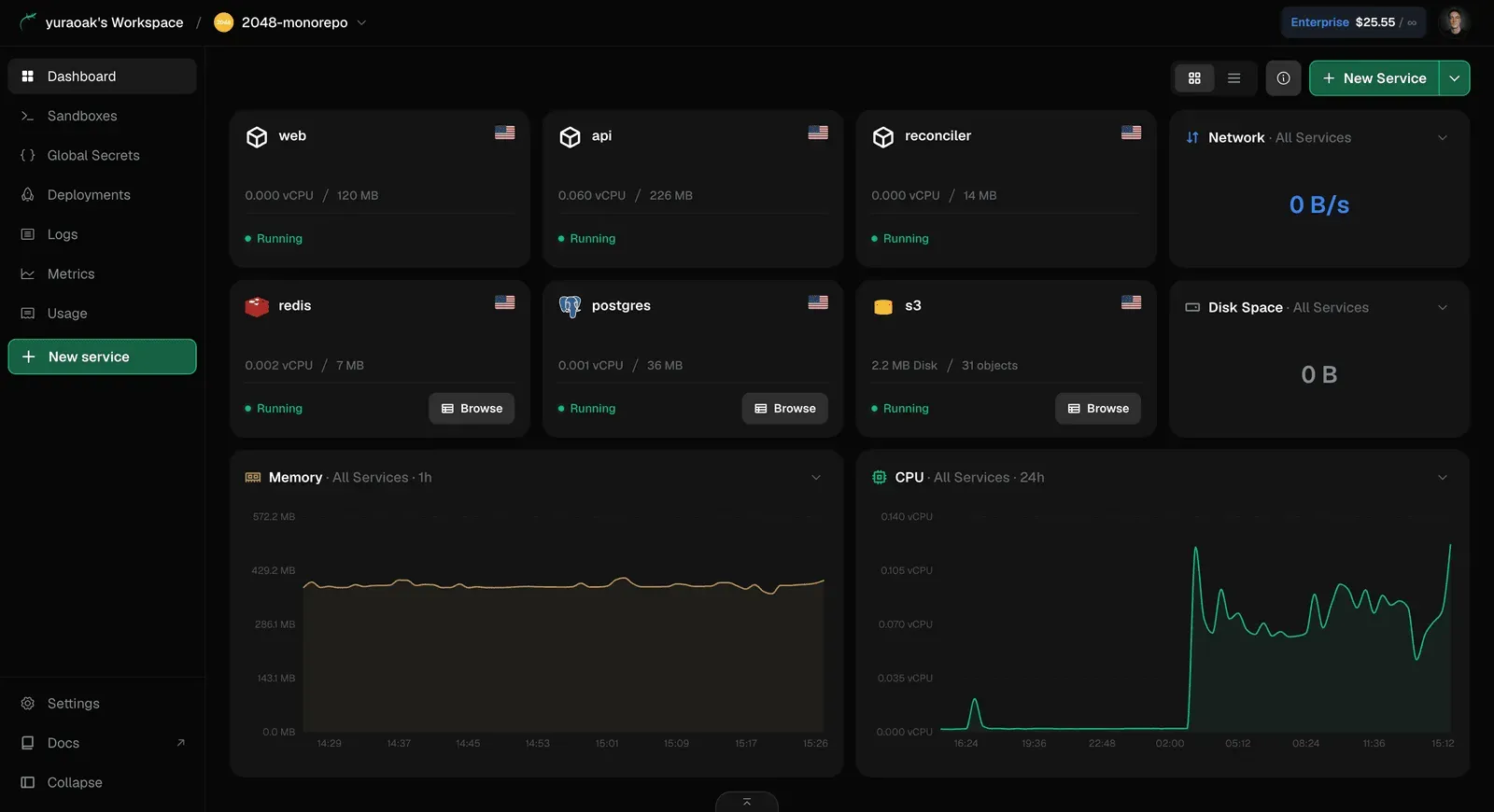
Built-In Logs and Metrics: Every service gets live log streaming and request metrics out of the box. Logs are agent-readable (structured JSON lines) and can be pulled via CLI commands, making it trivial for an AI to diagnose production issues and propose fixes.
Compliance & Enterprise Readiness: For larger organizations, Lizard offers SOC 2 and HIPAA compliance, SSO/SAML, role-based access control, and audit logs on the Enterprise plan.
The Lizard workflow is designed to be as frictionless as possible. After connecting a Git repository, the user (or their agent) runs lizard up from the CLI. Lizard then builds the app using a generated Dockerfile, provisions any requested managed services, and deploys to an isolated container—each app runs in its own pod, with resources allocated on-demand.
A typical session with an AI agent might look like this: the agent runs npx lizard up --postgres --redis, Lizard creates the app and databases, outputs connection details in JSON, and the agent writes them to the environment. When code is pushed, a webhook triggers a new build and deploy, with status updates streamed back to the terminal.
For debugging, the agent can invoke lizard logs --service web --tail to stream structured logs, or lizard metrics to see real-time CPU and memory usage. The dashboard provides the same data visually for human developers, but the CLI is where Lizard truly shines—it makes the entire platform scriptable.
Lizard also provides a web dashboard for when a visual interface is preferable. The dashboard shows deployments, services, databases, and cost breakdowns, making it easy to trace what a coding agent deployed and how much it charged.
Lizard is not a one-size-fits-all solution; it’s specifically optimized for AI-centric and agent-driven development workflows. That said, several profiles can benefit enormously:
Solo Developers Using AI Assistants: A developer who relies on Claude Code or Cursor to scaffold and iterate can give the agent full deployment access. The agent sets up the entire stack, monitors production, and rolls back automatically when tests fail—all with human sign-off only at the end.
Startups Shipping MVPs Fast: Startups need speed and low burn rate. Lizard’s free $5 credit and per-second billing mean a side project or MVP can run for pennies. The one-command provisioning of Postgres and Redis reduces setup time from hours to seconds.
Teams Migrating from Railway or Render: The homepage includes a migration section and claims that a coding agent can carry over secrets, domains, and data. Any team already using a PaaS but frustrated by opaque builds or rising costs can move with relative ease, especially since lizardpack generates standard Dockerfiles that are portable.
Agencies Building Client Projects: Agencies can hand a coding agent the keys to a production environment, have it spin up staging and preview environments for each client, and bill usage precisely to the project—per-second billing makes per-client cost tracking much more accurate.
Enterprises Requiring Compliance: With SOC 2 and HIPAA on the Enterprise plan, Lizard satisfies the compliance needs of healthcare and enterprise clients, while still providing the AI-native workflow that modern development teams expect.
Lizard offers a free plan that includes $5 in credit for the first month—no credit card required. The Hobby plan starts at $5/month and is marketed as covering a typical side project with room to spare. There are also Pro and Enterprise tiers for teams with advanced needs like SSO, audit logs, and dedicated support.
The key economic advantage is per-second billing. In the cost comparison calculator on the homepage, Lizard shows a 41% lower monthly cost versus AWS for the same workload with a 2 vCPU / 4 GB instance at 15% average CPU utilization. Because Lizard charges for measured memory (the working set), idle apps cost almost nothing—evicted pages aren’t billed. For developers with low-traffic apps or background workers that only occasionally flare up, this can cut infrastructure costs by more than half. It’s worth checking the official pricing page for the latest tier details and any free quota changes.
Lizard is one of the few platforms that genuinely earns the “AI-native” label. By building the CLI, logs, and deployment pipeline around machine-readable output, it creates a seamless bridge between AI coding agents and production infrastructure. The one-command managed databases, transparent Dockerfile generation, and per-second billing are practical benefits that also appeal to traditional developers.
The main caveats are its relative youth and the fact that some advanced features are locked behind the Enterprise plan. There’s also a risk that agent-driven deployment could become too autonomous; teams will need proper guardrails and reviews to avoid accidental bills or breaking changes. Still, for developers and startups that already rely on AI assistants, Lizard is a compelling choice. The documentation is thorough, and the team seems actively engaged in responding to community feedback. It’s a platform worth deploying to—especially if your coding agent is begging for a better cloud.